How WhatsApp appointment booking works for a dental clinic
A clear look at what happens from a patient's first message through to booking, reminders, changes and a staff handover.
Ammar Mahmood, Founder, Zeliks
Updated 5 min read
WhatsApp appointment booking for dental clinics gives patients a familiar way to arrange a visit without calling during reception hours. What matters to the clinic is whether the time shown to a patient is real, whether staff stay in control, and whether the record stays correct when plans change.
This is how a well-designed flow works, using ToothPing as a practical example. It covers a patient's first message, the checks behind a booking, reminders, changes and the points where a person should step in.
What patients see in a WhatsApp booking chat
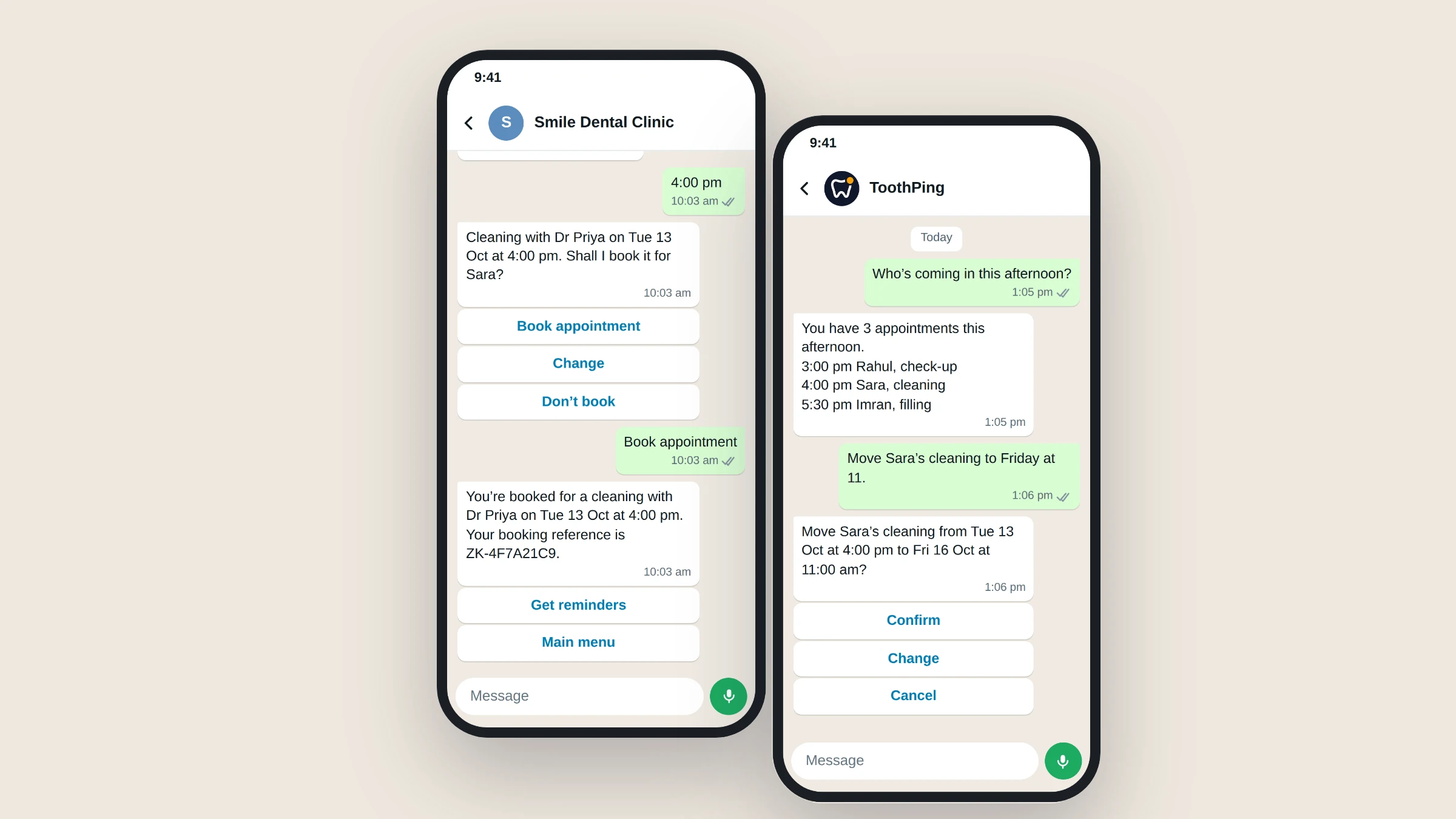
A patient starts by messaging the clinic's WhatsApp Business number. ToothPing can show a short menu for booking, upcoming appointments, clinic timings, directions and a way to talk to a person. A patient who writes something like "cleaning on Saturday morning" can also be guided to the available times for that request.
For a booking, the patient chooses a treatment, a doctor where the clinic has more than one, and a time. The choices come from that doctor's working hours, treatments and diary. A clinic can run its schedule inside ToothPing or connect Google Calendar, so the patient should only be offered a time that the booking system considers free.
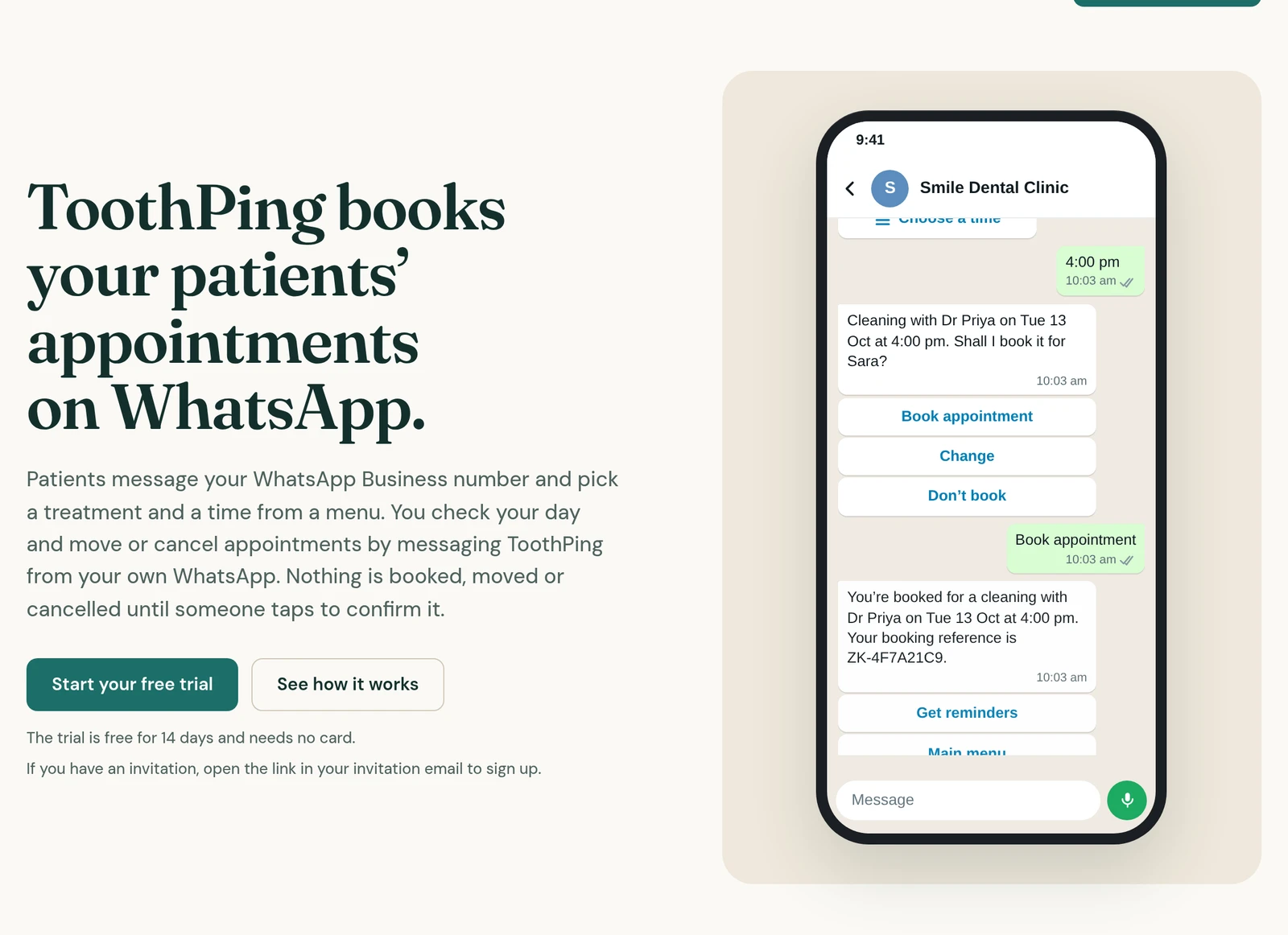
The chat should say what will happen before it happens. ToothPing shows the treatment, doctor, date and time, then asks the patient to confirm. The patient receives a booking reference after the appointment is made. That final confirmation step makes a wrong tap easier to catch before it reaches the diary.
A chosen time needs a protected booking step
Showing a free time is not the same as booking it. Two patients can ask for the same 4:00 pm slot within seconds of each other. A chat reply alone cannot decide who gets it. The scheduling system needs to check the slot again at the moment it writes the appointment.
ToothPing's booking code does this with a hold and a final availability check. When a patient reaches the booking step, the chosen slot is checked against the clinic's rules and current conflicts, then protected while the confirmed appointment is saved. The stored booking record, rather than the wording in a message, decides whether the time can be taken.
That matters when a clinic uses its own schedule and when it uses Google Calendar. In both cases, the system should fail safely if it cannot check the diary. It is better to tell the patient that the clinic will get back to them than to promise a time it cannot verify.
Confirmation comes before a calendar change
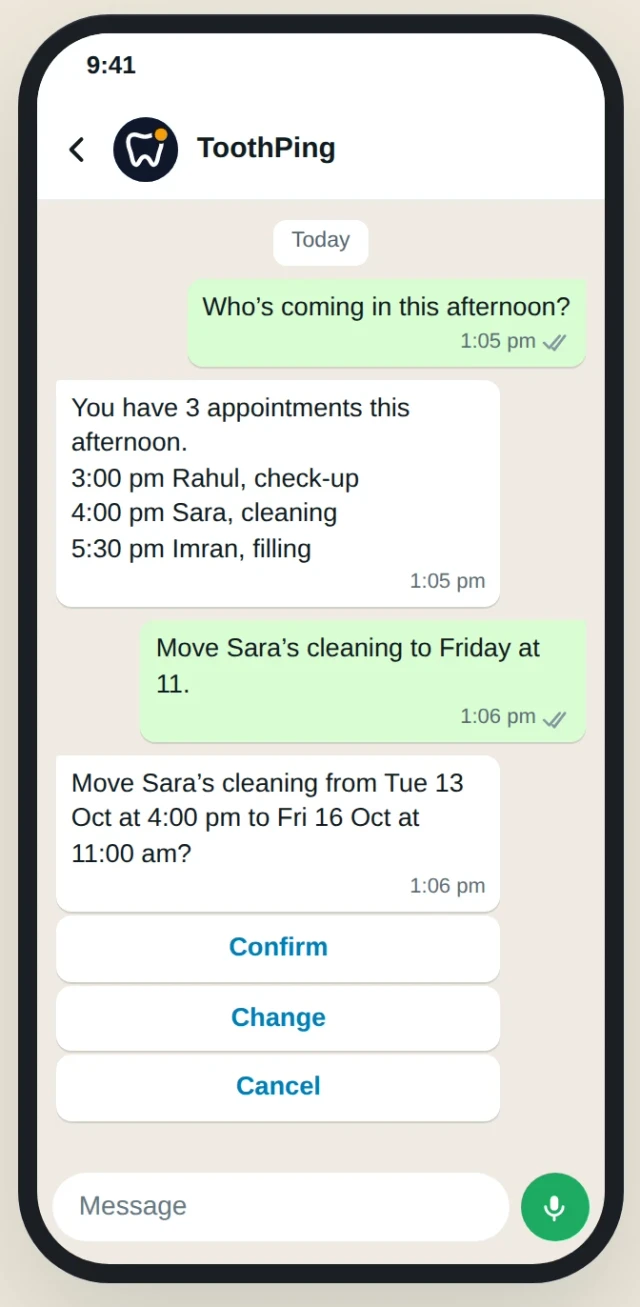
ToothPing keeps booking, moving and cancelling behind a confirmation. It shows the change first and waits for a tap. Clinics that want to check patient bookings themselves can choose an approval step before a booking becomes final.
This is useful for the reception team too. A confirmed appointment has a clear record, rather than a loose conversation that someone must interpret later. If the clinic is connected to Google Calendar, the confirmed booking is added there. If it uses ToothPing Schedule, the appointment stays in the clinic's ToothPing diary.
Staff still decide the clinic's rules. They set the hours, treatments, doctors and any time that must be blocked for leave, meetings or walk-ins. The assistant follows those rules. It does not invent extra availability to make a conversation feel helpful.
Reminders and appointment changes stay in the same chat
After booking, a patient can ask for a reminder for the day before. The reminder gives clear actions to confirm, move or cancel. Keeping those actions in the existing conversation means the patient does not need a separate portal or a reference number from an old email to make a change.
A patient can also open their upcoming appointments and request a new time or a cancellation. The same rule applies: the proposed change is shown before it is saved. ToothPing also lets the clinic owner review the day's list, find a free time, book, move or cancel appointments by messaging ToothPing from their own WhatsApp account.
For businesses using the WhatsApp Business Platform, reminders and follow-up messages also need to follow WhatsApp's Business Messaging Policy. The policy requires a clear route to a human, and it has rules for consent and messages sent outside the customer service window. Those rules should be part of the clinic's setup, not an afterthought.
Staff can take over without starting again
Some messages should leave the automated path. ToothPing gives patients a way to call the clinic, leave a message or ask to talk to a person. Staff can then see the conversation in context rather than asking the patient to repeat the treatment, date and question from the beginning.
The same applies when the system cannot safely complete a booking. If the diary cannot be checked, the clinic can take the request over instead of leaving the patient with a vague promise. A useful handover says what has happened, what has not happened and what the patient can expect next.
Appointment booking has clear limits
A booking assistant can handle appointments, timings and directions. It does not diagnose symptoms or give treatment advice. Clinical questions and urgent concerns must go to qualified clinic staff. ToothPing's public patient flow makes this boundary plain and offers the clinic's phone number when a patient mentions pain or an emergency.
That boundary protects patients and the clinic. It also keeps the assistant focused on the job it can do reliably: arranging a visit, keeping the diary accurate and making it easier for a patient to reach the right person. If you are planning a patient-facing booking flow, what we build is a good place to see the kind of work Zeliks takes on.
If your reception team is spending too much time on repeat booking messages, get in touch. We can look at the current process and help you decide whether a WhatsApp booking assistant fits it.
Common questions
- Can patients book a dentist appointment on WhatsApp?
- Yes. A booking flow can let patients choose a treatment, doctor and available time in a WhatsApp chat, then confirm the appointment before it is saved.
- How do you stop two patients booking the same time?
- The booking system checks the slot again while creating the appointment and protects it during that step. A message that merely says a time is free is not enough.
- Can a patient move or cancel an appointment on WhatsApp?
- They can be shown their upcoming appointments and offered a change or cancellation path. The new time or cancellation should be confirmed before it reaches the diary.
- Can a WhatsApp dental assistant give medical advice?
- No. It should handle booking and clinic information, then direct clinical or urgent questions to qualified clinic staff.
Written by Ammar Mahmood, Founder of Zeliks. We build websites, apps, AI assistants and automation, and the client owns the code. About Zeliks